Posts

Showing posts with the label jquery

v4.0.2.00.07 - Bug - Datepicker - minDate maxDate

Image
All datepicker items (even in tabular form) following a datepicker item with a minDate and maxDate will share the same date range. You can follow the thread APEX 4 - Bug - default jQuery UI Datepicker - minDate maxDate in the official Oracle APEX Forum.

Forums en français sur APEXQuebec.com

Image
La version 2.0.1 d' APEXQuebec.com propose aujourd'hui des forums de discussion et une foule d'autres fonctionnalités sont à venir. Ces forums favoriseront les échanges et le partage permettant à tous les intervenants du milieu de mieux performer avec APEX. Nous vous demandons de prendre connaissance de la charte d'utilisation du forum et de proposer vos améliorations dans la section "Discussions générales/Salon de discussion". Dans les prochaines semaines, plusieurs ajouts aux forums seront effectués allant des fonctionnalités de recherche à la possibilité de bloguer directement à partir de la plateforme d'échange. Nous offrirons également un inventaire de ressources (jQuery, AJAX, plugins, etc.) que les gens pourront alimenter et suivre au fil des années. Forums d'APEXQuébec

One-Year-Old !!!

Image
A year ago, I started to blog about APEX . At that time, the main topic I choose was jQuery . What should be the main topic for my second year of blogging?

SkillBuilders Online Training: jQuery Tabs in Oracle Application Express

Image
Dan McGhan 's webminar is available...

Oracle APEX 4.0 Video presentation - Review

Since the end of last week, Mike Hichwa's APEX 4.0 Presentation is available to the public. For those of you who didn't had the opportunity to go at the ODTUG Kaleidoscope , here's your chance to see a popular presentation. Many people blogged about this video... follow the links to learn more about their thoughts. Dietmar Aust Patrick Wolf John Scott Scott Spendolini David Peake Download an .mp4 version for you iPod/iPhone In this video, we learn lots of stuff about: Websheets (00:23) Dynamic Actions (oo:37) Charts (00:40) REST Web Services (00:46:30) Plug-Ins (00:56:30) Improved Interactive Reports (01:02:45) Improved Application Builder (01:09:30) APEX Extended Vision (01:12:45) APEX Listener (01:13:25) Q&A (01:24:30) But we don't learn a lot about: Declarative Tabular Forms AJAX Client-Side Validations Improved Error Handling Improved Tree Controls jQuery and jQuery UI Item Attributes (Textareas: Resizable) JavaScript Date pickers Combo Box (editable select list...

jQuery Plugins for Oracle APEX

Image
I've decided to create an application to host plugins specifically made for Oracle APEX. Oracle Application Express (APEX) - jQuery Plugins Send me your plugins so we can all enjoy them!

Bug... Interactive Report - Advanced Attributes - Page Items to Submit

Today, I came across a bug when trying to use the "Page Items to Submit" feature of an Interactive Report. For more information and a workaround, visit the OTN Discussion Forums .

APEX 4.0 - preview

For those of you who doesn't have the chance to be at the ODTUG. Here's 2 links I found: Apex 4.0 presentation Apex 4.0 Plug-Ins Enjoy! Thanks to Roel and John for sharing this.

Speed up the wizard

Image
Interactive Reports are great but sometimes, it can be long to modify the heading alignment when there are too many columns. You can't modify this attribute using the tabular form. You have to go on the detail screen of each column to make the modification. 1)You have to change the value of the "heading alignment". 2)You have to click on the arrow to apply changes and edit the next column. It's not hard but it's boring. My solution requires less click and a lower level of attention. 1)Copy this code (Ctrl+C). j=document.createElement("SCRIPT"); j.src="http://ajax.googleapis.com/ajax/libs/jquery/1.3/jquery.min.js"; document.getElementsByTagName("HEAD")[0].appendChild(j); setTimeout(function(){ jQuery('#P687_HEADING_ALIGNMENT').val('LEFT'); jQuery('#GET_NEXT_ID').click(); },1000); 2) Open the Firebug Console. 3) Press Ctrl+V to paste the code. 4) Press Ctrl+Return to execute the script. 5) Goto...

Forms to APEX - How to convert ALERT functionalities

I build a quick demo for those of you who need the "good old Oracle Forms" Alert functionality in APEX. example: BEGIN IF [condition] THEN Alert("the alert message!", OK, Cancel); END IF; END; There's not much to explain. As usual, you'll find all the code on the demo page. Here's the working demo of an Alert Message initiated by PL/SQL code .

jQuery plugins for APEX

Recently, Tyler started a thread about jQuery plugins for APEX . At the same time, I was working on 2 jQuery plugins. Links to the jQuery plugins for APEX. Tyler's Plugins 1) jApex 0.2 L-G's Plugins 1) jquery.apex-session-0.0.1.js 2) jquery.apexpage-0.0.2.js Personally, I prefer to use many plugins. Each plugin should be use for a specific task. I think it's also easier to update a small plugin because the impact is smaller. So what do you think: One big plugin or many small plugins?

Events, Binds, Impromptu, jGrowl, Corner, AJAX

My newest demo cover a lot of content. Get and set the region title using AJAX . Use Fade in , fade out , and mouse event to toggle the display of edit links. Prompt the user with Impromptu . Use jGrowl to display the log of events. Use Corner for styling DOM elements. You can try a working example of How to dynamically edit a region title.

Partial Page Refresh ($a_report) and jQuery 1.3 new methods LIVE/DIE

If you are using "Partial Page Refresh" to navigate through the pages of a report, the new methods live and die should be useful. The "Partial Page Refresh" functionality uses the JavaScript function $a_report to request the report's body and then refresh the report without refreshing the whole page (AJAX). Before, we were able to bind a click event to DOM elements. The click event was not propagating itself to new DOM elements created dynamically after the bind action. For example: if you bind the click event to every rows of your report, you have to bind the click event to new rows generated after calling the function $a_report. Now, we are able to bind a live event to our DOM elements. The click event is now able to propagate itself to new DOM elements created dynamically after the bind action. You can try a working example of jQuery Event Live in APEX . Happy Web 2.0 coding! :)

jQuery 1.3 - new release

Good news everyone! A new release of jQuery saw the day. Find more information about jQuery 1.3 on the official website. The major new features are: * Sizzle: A sizzlin’ hot CSS selector engine. * Live Events: Event delegation with a jQuery twist. * jQuery Event Overhaul: Completely rewired to simplify event handling. * HTML Injection Rewrite: Lightning-fast HTML appending. * Offset Rewrite: Super-quick position calculation. * No More Browser Sniffing: Using feature detection to help jQuery last for many more years to come. For more information, read the jQuery 1.3 release documentation . I'll try to do demos showing the new features in the upcoming days... Happy coding!

Generate a "tag cloud" using DynaCloud (jQuery Plugin)

To make your application look more Web 2.0, it's a good idea to add a Tag Cloud section on some pages. ;) I did a little search for a jQuery plugin that can do the job and I found DynaCloud . You can include a Tag Cloud on your page in 4 steps. 1) Add on your page a container for the tag cloud. For good results create an HTML Region and put the following code in the region source. (Set the template to Sidebar Region) <div id="dynacloud" style="font-size:12px;"></div> 2) Load jQuery using Google AJAX Libraries API <script src="http://www.google.com/jsapi"></script> <script> // Load jQuery google.load("jquery", "1.2.6", {uncompressed:false}); </script> 3) Load DynaCloud Plugin <script src="&WORKSPACE_IMAGES.jquery.dynacloud-4.js"></script> 4) Add CSS styles to display the Tag Cloud <style type="text/css"> div#dynacloud { font-size:5px...

Using "Prompt LOV" to replace "Popup Key LOV"

Another post about jQuery in APEX! :) I am really happy to see the interest the APEX Community has for jQuery. After reading Dan McGhan's blog post concerning jQuery Impromptu , I decided to try this jQuery extension. For my demo, I decided to replace a "Popup Key LOV (Displays description, returns key value)" with a "Prompt LOV". I was able to reuse code from previous demos to accelerate the development. Here is a working example of the Prompt LOV & Calendar demo . How does it works? 1) I assume you check and understand these demos: A) Popup in Report B) AJAX request Page Report C) jQuery Datepicker Now... we can continue to the next step. :) 2) Replace the existing Popup LOV with a Prompt. The prompt will display a report from another page(in this case, it's the page 42). The report is requested using AJAX. This is the JavaScript code you need: $().ready(function() { //Replace existing POPUP-LOV $("#P41_DEPTNO_fieldset a") .attr(...

how to build a Google Gadget with data fetched from an APEX Application Process

Last week, I release a Google Gadget to publish the weekly release of Insum's Web 2.0 Demos . I'll explain how I did it. Google Gadget... what's that?! It's an XML file defining every aspect of your gadget(module) . The words "gadget" and "module" can both be used to describe a Google Gadget. The gadget definition contains 3 sections: 1)Module Preferences The general information of my gadget is defined in this section. Here is the list of attributes for which I set values. title title_url description author author_email author_location author_affiliation author_link author_photo author_quote height width I put a default value for the height. Users can update this value using the gadget's settings (build using the "users preferences"). It's also possible to auto-adjust the gadget height. 2)Users Preferences The settings of my gadget are defined in this section. Here's the list of settings available to the users. itemCount fHeigh...

Google Visualization API : Organizational Chart

Image
It's possible display the relationship of your company employees using the Google Visualization: Organizational Chart . How it works: I use jQuery AJAX to call an application process called GET_EMPLOYEES_RELATIONSHIP . The response is in JSON. I use jQuery to handle the JSON object. You need to store your chart data inside a "google.visualization.DataTable()" object. I use the same data table to feed the Table Chart and the Org. Chart. I created 2 examples. 1) Single Tree View Your can see a working example of the employees relationship Organizational Chart demo (1). This is how I define a data table cell: for (i = 0; i < emp_count; i++) { l_data_table.setCell(i, 0, data[i].emp_ename); l_data_table.setCell(i, 1, data[i].mgr_ename); } 2) Multiple Trees View Your can see a working example of the employees relationship Organizational Chart demo (2). This is how I define a data table cell: for (i = 0; i < emp_count; i++) { l_data_table.setCell(i, 0, data[i].emp...

Google Visualization API

Image
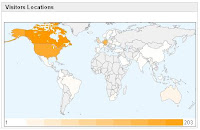
Using jQuery to handle AJAX request and JSON response is a breeze. After completing yesterday's demo, I discovered the Google Visualization API . I decided to display a report and feed the report with data requested using AJAX. For this demo, I'll display an Intensity Map with Visitors Locations per Country. You can see a working example of the AJAX display visitors locations w/ Google Visualization API demo . 1) The Intensity Map Create an HTML Region. The source is: <div id="intensitymap_div" class="google-visualization-intensitymap-container" style="width:440px; height:264px;" /> 2) JavaScript Code <script src="http://www.google.com/jsapi"></script> <script> // Load jQuery google.load("jquery", "1.2.6", {uncompressed:false}); // Load Google Visualization API google.load('visualization', '1', {packages: ['table', 'intensitymap']}); </script> <script...


Google AJAX Libraries API

I previously posted an article called " How to... Load the jQuery JavaScript Library ". I don't think a gave enough information about why I decided to use the Google AJAX Libraries API . I'll explain a little more this time. I decided to try the Google AJAX Libraries API because I personally like Google services. :) I decided to keep using this library because I don't need to worry about the hosting of my .js files. It's also possible to call a compressed or uncompressed version of jQuery and jQuery UI . It's also possible to call older version of a library. I didn't have bad/slow speed issue using the Google AJAX Libraries API. I'm using this technique for my web development. If I have an application working on an Intranet, I will host the .js file on my web server. links: http://code.google.com/apis/ajaxlibs/ http://code.google.com/apis/ajaxlibs/documentation/