Posts

Showing posts with the label plugin

Accessibilité d'une application Web - Contraste des couleurs
Image
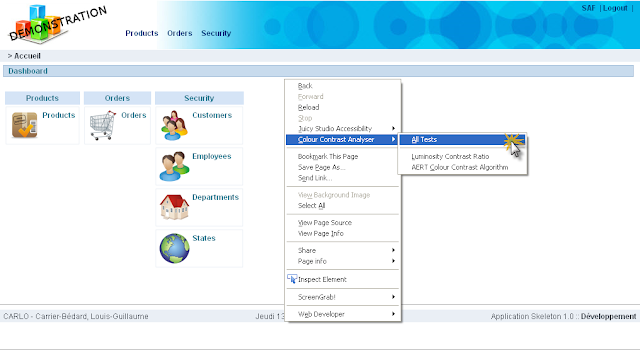
L'accessibilité Web regroupe une multitude d'éléments à considérer. Lorsque vient le temps d'analyser le contraste des couleurs sur une page web, on peut utiliser  Colour Contrast Analyser , une extension pour Firefox. Juicy Studio offre un moyen simple pour calculer les ratios de luminosité et de contraste . Ce n'est pas le meilleur des outils que j'ai trouvé pour effectuer cette tâche par contre, il est minimaliste et c'est ce qui est préférable pour commencer. Pour plus d'informations concernant les contrastes entre les couleurs d'arrière plan et d'avant plan: " Ensure that foreground and background color combinations provide sufficient contrast when viewed by someone having color deficits or when viewed on a black and white screen " -World Wide Web Consortium (W3C) C'est un article qui date de 2000. Pour des informations plus récentes: Standards d'accessibilité du W3C Colour Contrast Analyser  - Extension Firefox Pou...

jQuery plugins for APEX

Recently, Tyler started a thread about jQuery plugins for APEX . At the same time, I was working on 2 jQuery plugins. Links to the jQuery plugins for APEX. Tyler's Plugins 1) jApex 0.2 L-G's Plugins 1) jquery.apex-session-0.0.1.js 2) jquery.apexpage-0.0.2.js Personally, I prefer to use many plugins. Each plugin should be use for a specific task. I think it's also easier to update a small plugin because the impact is smaller. So what do you think: One big plugin or many small plugins?

Generate a "tag cloud" using DynaCloud (jQuery Plugin)

To make your application look more Web 2.0, it's a good idea to add a Tag Cloud section on some pages. ;) I did a little search for a jQuery plugin that can do the job and I found DynaCloud . You can include a Tag Cloud on your page in 4 steps. 1) Add on your page a container for the tag cloud. For good results create an HTML Region and put the following code in the region source. (Set the template to Sidebar Region) <div id="dynacloud" style="font-size:12px;"></div> 2) Load jQuery using Google AJAX Libraries API <script src="http://www.google.com/jsapi"></script> <script> // Load jQuery google.load("jquery", "1.2.6", {uncompressed:false}); </script> 3) Load DynaCloud Plugin <script src="&WORKSPACE_IMAGES.jquery.dynacloud-4.js"></script> 4) Add CSS styles to display the Tag Cloud <style type="text/css"> div#dynacloud { font-size:5px...

Using "Prompt LOV" to replace "Popup Key LOV"

Another post about jQuery in APEX! :) I am really happy to see the interest the APEX Community has for jQuery. After reading Dan McGhan's blog post concerning jQuery Impromptu , I decided to try this jQuery extension. For my demo, I decided to replace a "Popup Key LOV (Displays description, returns key value)" with a "Prompt LOV". I was able to reuse code from previous demos to accelerate the development. Here is a working example of the Prompt LOV & Calendar demo . How does it works? 1) I assume you check and understand these demos: A) Popup in Report B) AJAX request Page Report C) jQuery Datepicker Now... we can continue to the next step. :) 2) Replace the existing Popup LOV with a Prompt. The prompt will display a report from another page(in this case, it's the page 42). The report is requested using AJAX. This is the JavaScript code you need: $().ready(function() { //Replace existing POPUP-LOV $("#P41_DEPTNO_fieldset a") .attr(...