multiple regions under a single tab
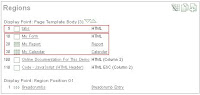
Last week, I write about using jQuery UI Tabs to show each region of my page under a tab . Denes Kubicek send me a message asking if it was possible to display more than one region under a single tab. The answer is yes. But how? I tried 3 different ways to do it. I'll first explain the better/simpliest solution. First, I made a page copy of my last demo (page 30). Don't forget to add the static ID for the regions on the copied page (page copy removes regions static ID)... this is probably a bug in APEX. 1) First solution (working) A. I modified the source of the first region called "TABS". The Region Source is: <div id="my_tabs"> <ul> <li><a href="#form_report"><span>My Form & Report</span></a></li> <li><a href="#my_calendar"><span>My Calendar</span></a></li> </ul> </div> B. Add the jQuery code to my page HTML header. <script src="...