Posts

how to build a Google Gadget with data fetched from an APEX Application Process

Last week, I release a Google Gadget to publish the weekly release of Insum's Web 2.0 Demos . I'll explain how I did it. Google Gadget... what's that?! It's an XML file defining every aspect of your gadget(module) . The words "gadget" and "module" can both be used to describe a Google Gadget. The gadget definition contains 3 sections: 1)Module Preferences The general information of my gadget is defined in this section. Here is the list of attributes for which I set values. title title_url description author author_email author_location author_affiliation author_link author_photo author_quote height width I put a default value for the height. Users can update this value using the gadget's settings (build using the "users preferences"). It's also possible to auto-adjust the gadget height. 2)Users Preferences The settings of my gadget are defined in this section. Here's the list of settings available to the users. itemCount fHeigh...

Google Visualization API : Organizational Chart

Image
It's possible display the relationship of your company employees using the Google Visualization: Organizational Chart . How it works: I use jQuery AJAX to call an application process called GET_EMPLOYEES_RELATIONSHIP . The response is in JSON. I use jQuery to handle the JSON object. You need to store your chart data inside a "google.visualization.DataTable()" object. I use the same data table to feed the Table Chart and the Org. Chart. I created 2 examples. 1) Single Tree View Your can see a working example of the employees relationship Organizational Chart demo (1). This is how I define a data table cell: for (i = 0; i < emp_count; i++) { l_data_table.setCell(i, 0, data[i].emp_ename); l_data_table.setCell(i, 1, data[i].mgr_ename); } 2) Multiple Trees View Your can see a working example of the employees relationship Organizational Chart demo (2). This is how I define a data table cell: for (i = 0; i < emp_count; i++) { l_data_table.setCell(i, 0, data[i].emp...

Google Gadget - "Insum's Web 2.0 Demos - Weekly Release"

I decided to try the Google Gadget API after reading Bradley's post . I end up creating a notification gadget to publish "Insum's Web 2.0 Demos - Weekly Release" . It's now possible to stay up-to-date if you add this gadget to your blog, website, and/or iGoogle page. I'll write an article about the creation of such gadget. Enjoy!

Google Visualization API

Image
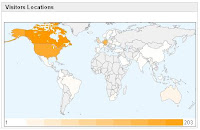
Using jQuery to handle AJAX request and JSON response is a breeze. After completing yesterday's demo, I discovered the Google Visualization API . I decided to display a report and feed the report with data requested using AJAX. For this demo, I'll display an Intensity Map with Visitors Locations per Country. You can see a working example of the AJAX display visitors locations w/ Google Visualization API demo . 1) The Intensity Map Create an HTML Region. The source is: <div id="intensitymap_div" class="google-visualization-intensitymap-container" style="width:440px; height:264px;" /> 2) JavaScript Code <script src="http://www.google.com/jsapi"></script> <script> // Load jQuery google.load("jquery", "1.2.6", {uncompressed:false}); // Load Google Visualization API google.load('visualization', '1', {packages: ['table', 'intensitymap']}); </script> <script...

using AJAX to dynamically translate a report

Image
I decided to push the AJAX integration a little bit further... Using jQuery and Google AJAX Language API , I was able to translate in "real time" a report. For my example, I decided to translate the records of a table containing the different states of the USA. I realize that this data is not the best for translation demonstration because many words are almost the same no matter what is the spoken language. To have better results, translate the data to Arabic, Chinese, Japanese or Korean. You can try a working example of the Dynamic Translation w/ Google AJAX Language API demo . 1) Report (Region Definition) Source: SELECT st ,initcap(state_name) AS state_name_en ,initcap(state_name) AS state_name FROM demo_states N.B. I had to use the initcap function on my data. Google translation engine is case sensitive. (I need to find more documentation to help with this issue.) 2) Report (Column Attributes) STATE_NAME_EN: Column Formatting > CSS Class: translate_src STATE_NA...

Google AJAX Libraries API

I previously posted an article called " How to... Load the jQuery JavaScript Library ". I don't think a gave enough information about why I decided to use the Google AJAX Libraries API . I'll explain a little more this time. I decided to try the Google AJAX Libraries API because I personally like Google services. :) I decided to keep using this library because I don't need to worry about the hosting of my .js files. It's also possible to call a compressed or uncompressed version of jQuery and jQuery UI . It's also possible to call older version of a library. I didn't have bad/slow speed issue using the Google AJAX Libraries API. I'm using this technique for my web development. If I have an application working on an Intranet, I will host the .js file on my web server. links: http://code.google.com/apis/ajaxlibs/ http://code.google.com/apis/ajaxlibs/documentation/

multiple regions under a single tab

Image
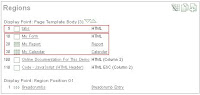
Last week, I write about using jQuery UI Tabs to show each region of my page under a tab . Denes Kubicek send me a message asking if it was possible to display more than one region under a single tab. The answer is yes. But how? I tried 3 different ways to do it. I'll first explain the better/simpliest solution. First, I made a page copy of my last demo (page 30). Don't forget to add the static ID for the regions on the copied page (page copy removes regions static ID)... this is probably a bug in APEX. 1) First solution (working) A. I modified the source of the first region called "TABS". The Region Source is: <div id="my_tabs"> <ul> <li><a href="#form_report"><span>My Form & Report</span></a></li> <li><a href="#my_calendar"><span>My Calendar</span></a></li> </ul> </div> B. Add the jQuery code to my page HTML header. <script src="...